Concepts
User Roles
The following user roles are available:
| Role | Menu Items | Capabilities |
|---|---|---|
| User Admin | Users, LDAP | Manage users and the LDAP integration |
| ISE Admin | ISE Server | Manage the ISE server configuration |
| ISE User | Endpoints | Manage ISE endpoints |
Roles should be combined to enable specific functionality:
| Role | Menu Items | Capabilities |
|---|---|---|
| User Admin + ISE Admin | User Role Mapping ISE Permission Presets | Configure mapping of LDAP groups to user roles Manage ISE permission presets |
| ISE Admin + ISE User | n/a | Automatic read/write access to all endpoints |
ISE Operations
All ISE operations are asynchronous. Whether adding a single endpoint or importing a CSV file containing 10,000 entries, the results of the ISE operation are returned via websockets.
Initially, a “pending” chip will appear, showing the number of endpoints being processed along with a running count indicating progress.

On completion, any errors will be shown in an “error” chip.
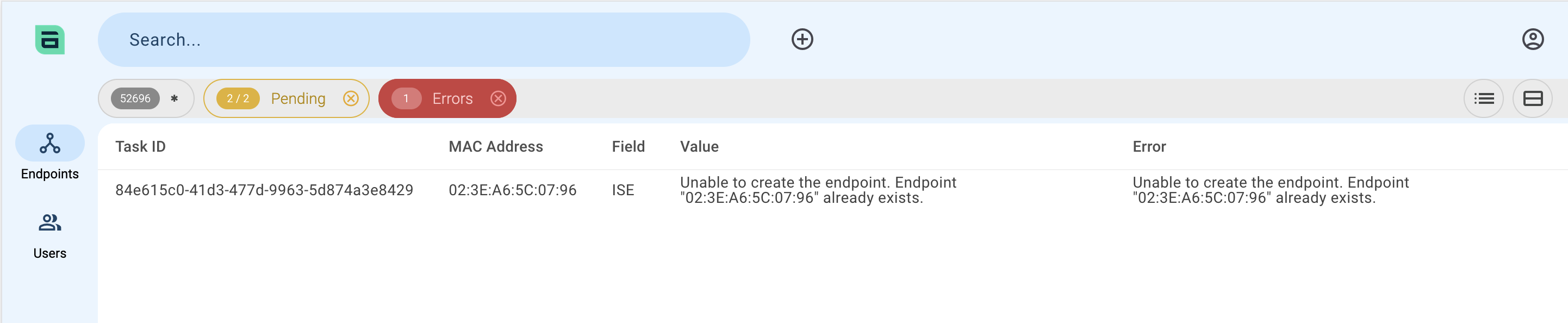
Currently, no output is provided in the case of successful operations.
ISE as Single Source of Truth:
The Cisco ISE database is considered the single source of truth.
The app also maintains a local database of ISE endpoints and identity groups in order to provide fast searching and browsing capabilities. This database is regularly synchronised with the ISE, in order to keep the data up to date.
The following two concepts apply:
- Viewing endpoints will use data from the local database (which could theoretically be out of date).
- Adding, Editing or Deleting endpoints will always communicate with the ISE database first, and update the local database as necessary.
ISE Permission Presets
ISE permission presets define a specific set of read and read-write permissions for ISE identity groups.
These presets may be:
- Mapped to one or more LDAP groups, and thus to the members of those groups as defined in AD.
- Applied directly to users (Note: Bulk editing of users is not supported. If ISE permission presets need to be applied to multiple users, consider using LDAP groups for this purpose).
A user’s specific permissions will be calculated based on the applied ISE permission presets. Any conflicts are resolved on an “additive” (or “permissive”) basis, whereby a read-write permission will override the read permission.
LDAP Integration
The LDAP integration enables the synchronisation of users from an Active Directory (AD) user directory system.
Furthermore, LDAP groups may be imported and applied to user roles and ISE permission presets.
Thus, user and permission management may be controlled directly from AD, reducing manual configuration in the application and maintaining a single source of truth for user and permission management.
LDAP Groups - Best Practices
To fully benefit from the LDAP group integration, mapping groups to user roles and ISE permission presets, the following AD group concept is recommended:
- Create AD groups corresponding to each user role in MAC Manager. Ensure that these share a common prefix - this makes it easier to write the appropriate LDAP filter.
Example:
IMM-ROLE-ISE-ADMINSIMM-ROLE-ISE-USERSIMM-ROLE-USER-ADMIN
Add users to the above groups as required to define their user roles in MAC Manager. For example, a “super admin” user can be created by adding the same user to all groups.
- Create AD groups corresponding to departments, teams, business units, etc., that should be mapped to ISE permission presets. Ensure that these share a common prefix.
Example:
IMM-PERMISSION-GROUP-1IMM-PERMISSION-GROUP-2IMM-PERMISSION-GROUP-3
Usage
Endpoints
Viewing and Searching Endpoints
Click on the Endpoints menu item to work with endpoints.
Search for endpoints using the search input. Each search opens a new search chip. The search currently matches all endpoint properties (MAC Address, Description and Identity Group).
Note:
- The Page size setting is shared across all search chips.
- The page is not maintained when browsing between search chips.
Viewing and Opening Identity Groups
Toggle between the Endpoints and Groups views using the buttons at the top right.

Clicking on a group opens a search chip containing all of the group’s endpoints.
The list of groups can be filtered using the search input.
Add Endpoints
Add endpoints - either singly or by importing a CSV file - using the Add button.

Edit and Delete Endpoints
Endpoints are edited or deleted via the hover actions:

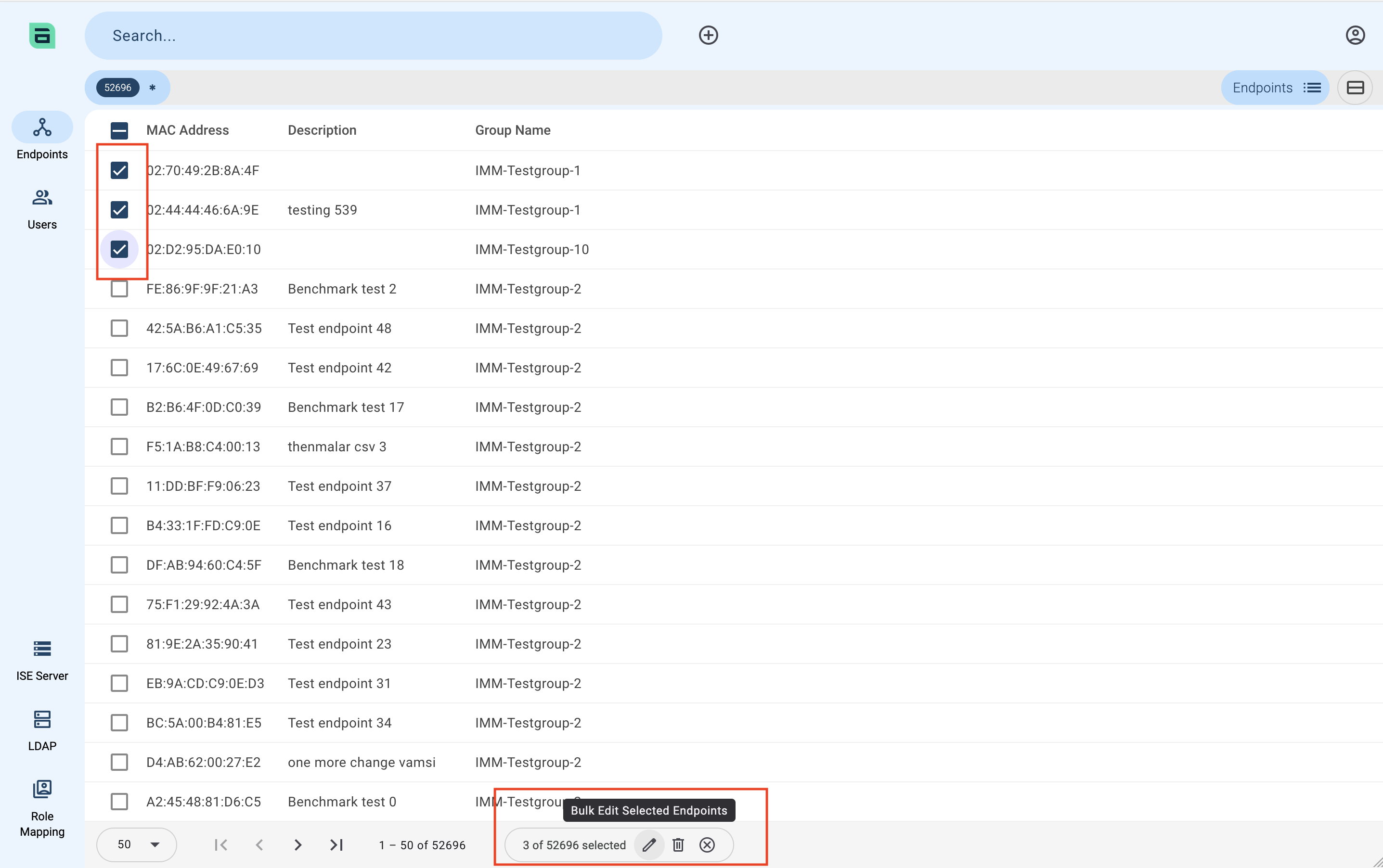
Bulk Edit and Delete Endpoints
Bulk Edit
Users
Click on the Users menu item to manage users and ISE permission presets.
Local users (e.g. to ensure administrator access in case of LDAP problems) may be added here.
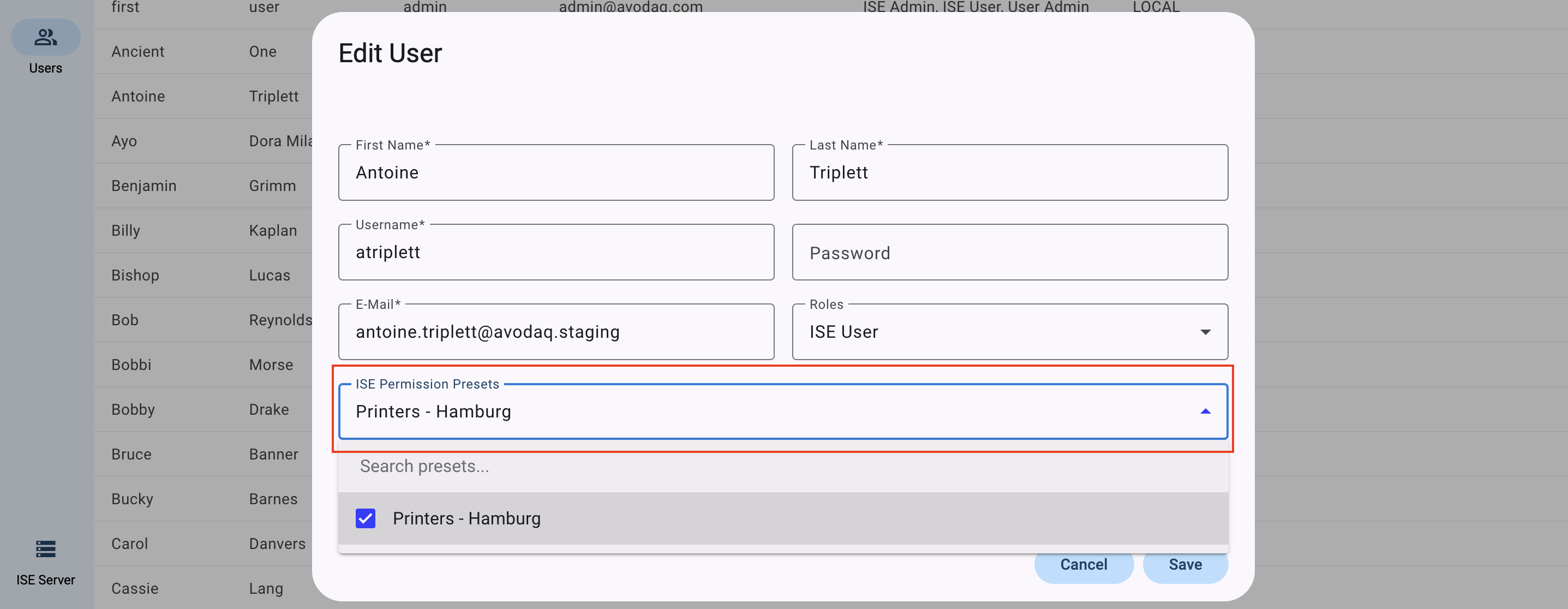
If mapping ISE permission presets directly to users is desired, hover over the user and use the Edit button.
If the user has the user role ISE User, the ISE Permission Preset dropdown will appear in the Edit dialog.
ISE Permission Presets
Click on the Users menu item and switch to the ISE permission presets view.

Create an ISE Permission Preset
Use the Add button to create a new preset.
- Initially, only a name is required.
- If LDAP Groups for ISE Permission Presets mappings have been configured, the groups may also be selected.
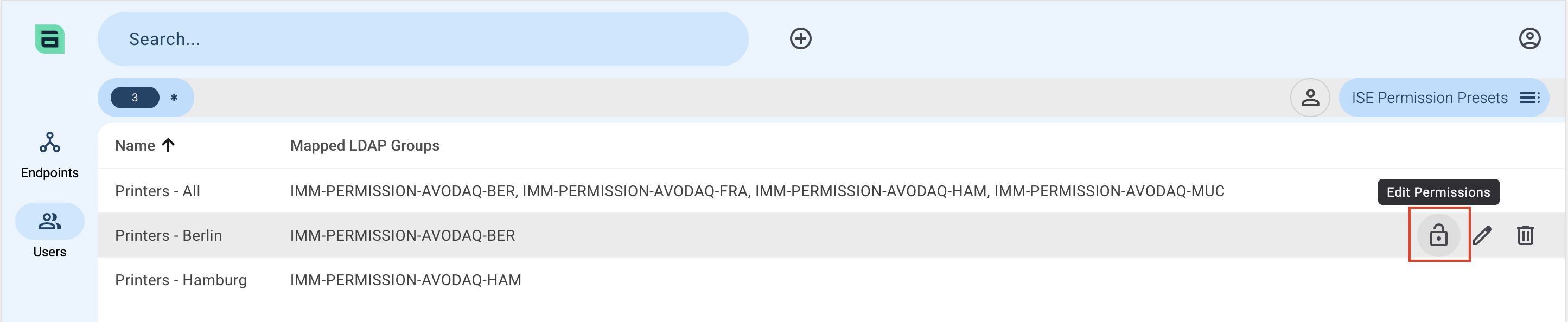
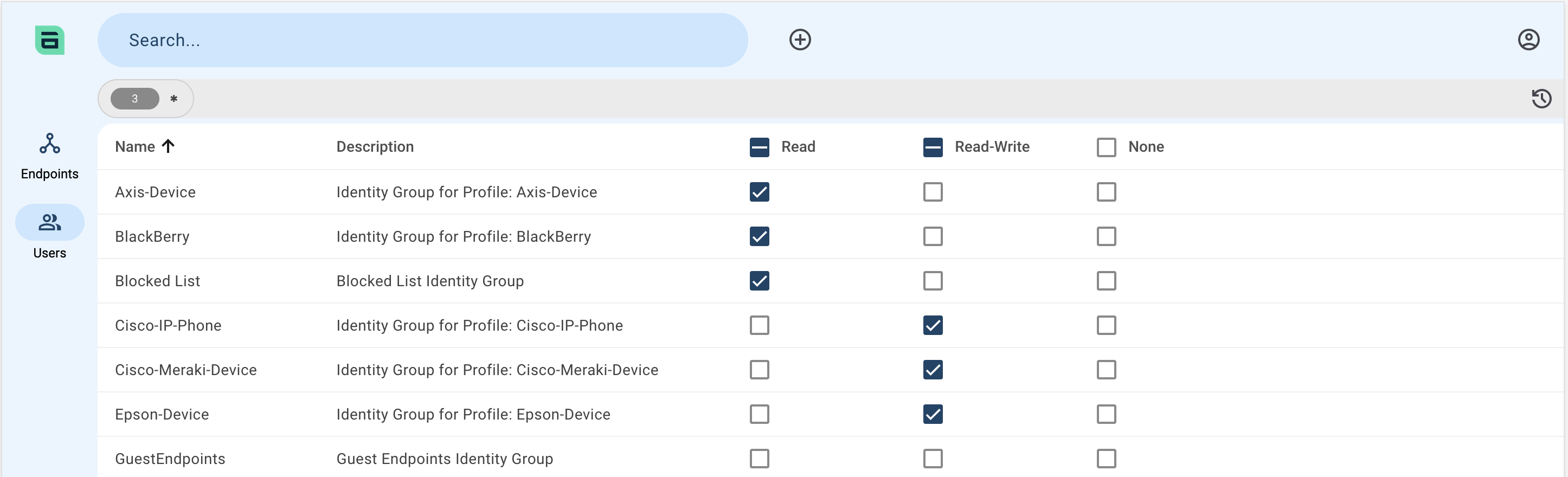
Apply Identity Group-based Permissions to the Preset
Hover and click the Padlock icon.
Apply the desired identity group-based permissions.
ISE Server
Navigate to the ISE Server page to configure the ISE Server.
| Field | Notes / Recommended Values |
|---|---|
| Name | |
| Host | Include the protocol (Example https://ise.company.com) |
| Port | 443 |
| Username | |
| Password | |
| Verify SSL | Verify the ISE server’s certificate using the provided root or full chain certificate (see the Technical Guide for details) |
Note: If a connection to the Cisco ISE is not possible, the entry cannot be saved.
Note: Use the username and password for the ERS Admin user created as per the Technical Guide.
LDAP
Configuring the LDAP Integration
Navigate to the LDAP page.
Add or edit the existing LDAP entry.
The Server chip contains basic connection data:
| Field | Notes / Recommended Values |
|---|---|
| Name | |
| Host | Do not include the protocol (Example: ad.company.com) |
| Port | Usually 389 for LDAP and 636 for LDAPS |
| Protocol | Choose between LDAP and LDAPS |
| Bind DN | DN of a user with read access to the directory |
| Password | Password for the user entered in Bind DN |
| Base DN | Base DN of the directory |
| Search Scope | Scope Subtree |
| Verify SSL | For LDAPS, verify the LDAP server’s certificate using the provided root or full chain certificate (see the Technical Guide for details) |
| Active | Activate the LDAP integration |
The basic connection data can be tested using the Test connection button. The button’s icon will update to reflect the result.
The Users chip configures the synchronisation of user objects:
| Field | Notes / Recommended Values |
|---|---|
| LDAP Filter | Define an LDAP filter which returns the desired user objects (Example: (memberOf=CN=IMM-ROLE-ISE-ADMINS,DC=company,DC=com)) |
| Attributes | |
| - ID | objectGuid |
| - Username | userPrincipalName or sAMAccountName |
| - First name | givenName |
| - Second name | sn |
mail |
Notes:
- It is advisable to use the three LDAP groups defined for user role mapping in the filter:
(|(memberOf=CN=IMM-ROLE-ISE-ADMINS,DC=company,DC=com)(memberOf=CN=IMM-ROLE-USER-ADMINS,DC=company,DC=com)(memberOf=CN=IMM-ROLE-ISE-USERS,DC=company,DC=com)) - If
sAMAccountNameis provided for the username, the Netbios Domain Name will be automatically fetched via LDAP and prepended to form a valid “Pre-Windows 2000” login name.
The Groups chip configures the synchronisation of LDAP groups for the purpose of mapping to User Roles and/or ISE Permission Presets:
| Field | Notes / Recommended Values |
|---|---|
| Attributes | |
| - Name | cn |
| - ID | objectGuid |
| LDAP Groups for User Role Mapping | |
| - Active | Activate the import of LDAP groups for the purpose of mapping to user roles |
| - Filter | An LDAP filter to return the desired groups (e.g. (&(objectClass=group)(name=IMM-ROLE-*))) |
| LDAP Groups for ISE Permission Presets | |
| - Active | Activate the import of LDAP groups for the purpose of mapping to ISE permission presets |
| - Filter | An LDAP filter to return the desired groups (e.g. (&(objectClass=group)(name=IMM-PERMISSION-*))) |
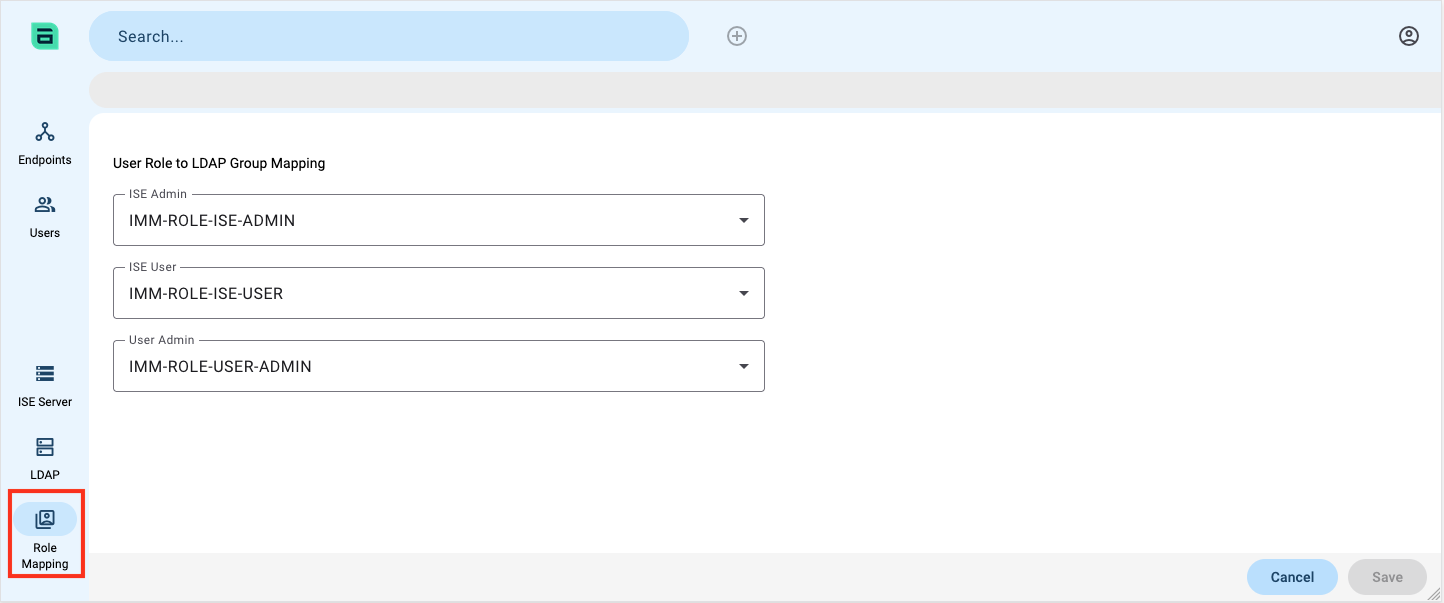
Role Mapping
If LDAP Groups for User Role Mapping has been configured on the LDAP page, these groups will be available for mapping to the user roles after the next sync.